Helping bank advisors retain ~30% more customers
A US fintech company asked me to turn its mortgage prediction engine into a product for bank advisors. I designed DataGems to help them spot customers likely to leave, find a suitable offer and prepare a call or message.
The MVP shipped in 3 months and reached a pilot with ~100 advisors at one of the largest US banks by month 7. Compared with its existing tools, the bank reported ~30% more customers retained per advisor per day and ~1 hour less daily preparation.
From a market signal to a customer conversation
Advisors needed to know which customers to contact and what to offer them. Managers needed to see what was changing across the portfolio. I worked with the company’s domain expert to turn those needs into flows and an interactive prototype. The engineering team developed the model; I designed how people worked with its results.
The main flow took advisors from a new signal to a customer list, then to an offer and the next conversation. Filters helped narrow the group, while contact history helped avoid approaching the same person too often.
The flow as text
- New rates come in and the run completes. Home shows a signal with the customers newly flagged, and the advisor opens them.
- The advisor filters by offer, state, loan and last contact until the group looks right. Anyone contacted in the last three days is left out of this round.
- The advisor reads why each customer is listed and chooses an offer for the group.
- A call opens the call view, with the customer’s details and offers in fixed places. A message is prepared from the offer, reviewed for audience, message and channel, and sent; the status shows Email sent.
- With no reply, the advisor follows up after three days. A reply is opened and a call booked, which goes to the call view. After the call, the outcome is logged and the status updates.
I tested the main workflows with target users, first in Figma and later in the working product. I asked them to find a relevant customer group, check recent contact and prepare the next action. I reviewed the sessions and click behaviour, then used what I learned to revise the next version.
Design decisions
A familiar starting point
My first dashboard had a lot of charts. It followed the brief, and I thought a fuller picture would help advisors decide where to start.
Watching specialists work changed my mind. They had already arranged their Excel dashboards around the information they needed each day. I used that as a starting point, removed the less useful charts and kept the views that supported their daily work.
I also replaced internal campaign names with familiar offer types. Advisors could choose an offer and open the list of customers who qualified, without having to work out what a campaign label meant.
From a signal to the right customers
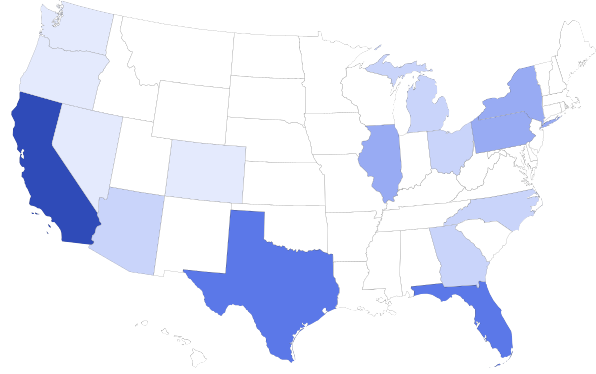
A signal gave advisors a starting point. They still needed to narrow the list and check who had already been contacted. I put those decisions together, with filters for the offer, location, loan details and recent contact.
Each row showed why the customer was listed and what had happened so far. The next action followed their status: prepare an offer, follow up on a message or open a reply.
An advisor prepared one offer for the whole selection, and each customer received it with their own figures: current rate, new rate and monthly payment.
Separate setup from daily updates
Portfolio files and interest rates changed on different schedules. Updating rates should not mean setting up the portfolio again, so I separated those flows.
For portfolio imports, I designed the first upload, validation and column mapping. When the same file format came back, users could reuse the previous mapping rather than match every field again.
The flow as text
- Getting in: credentials arrive by email and the user signs in, or asks for a reset and signs in again. A first visit shows onboarding before Home.
- From Home, a user who has uploaded before can open past uploads directly; otherwise they open the upload panel and upload a CSV.
- The file is validated. A file that fails returns to the upload step.
- If the file format has been mapped before, the previous mapping is reused. If not, the user maps the columns by hand.
- The file is sent for calculation, appears among past uploads, and the user opens the result to filter it, download it or read it as charts.
Make stale results visible
Rates could change several times a day. A result that was current in the morning could be out of date by the next call.
I showed when each source had changed and flagged calculations that needed updating. Advisors could run a new calculation or keep viewing the earlier result with its status clearly shown. They could also open previous runs and see the files behind them.
Flexible answers, predictable calls
Advisors and managers could ask more questions about the portfolio than we could cover with fixed dashboards. I designed the assistant as another way to explore the data and prepare an action.
Text answers · Early 2025
We started with answers from the project’s knowledge base and product data: for example, when rates were last uploaded.
Controlled Generative UI · Mid-2025
Next, we brought predefined components into the conversation. The assistant could return a portfolio chart and let the user open the full analytics view. I designed each response with a predictable layout and a clear next action.
Declarative Generative UI · Late 2025
In the pilot, people asked questions that did not fit the response layouts we had prepared. A useful answer might need a customer list, a comparison and an action together. That led me to design components the assistant could combine around the request.
A reply could bring together a customer table, selection controls and an offer action. I designed the components and how they worked together; A2UI described how to assemble them. Before sending an offer, the user could review the audience, message and delivery channel.
Show newly flagged customers I haven’t contacted this week, and help me invite them to discuss refinancing options.
12 customers in your book were newly flagged today and haven’t been contacted this week.
12 customers
By loan product
| Customer | Current loan | Rate vs today | Last contact | |
|---|---|---|---|---|
| Arthur Lane | Conv 30-Year · 7.25% | +0.38 pts | Never | |
| Guy Hawkins | FHA 30-Year · 7.05% | +0.45 pts | Never | |
| Devon Miles | VA 30-Year · 6.95% | +0.40 pts | Never | |
| Kristin Watson | Jumbo 30-Year · 7.55% | +0.45 pts | Never |
All 12 matching customers selected
Review email
- Audience
- 12 customers · Newly flagged · not contacted this week
- Channel
- Offer
- Rate & Term Refinance · invitation to discuss options
- Subject
- Options for your mortgage
Hello [First name], you may be able to lower your mortgage rate. Reply to this email or book a call with your advisor to discuss the options available to you.
The reply combines a customer list, selection and an email action around one request.
A fixed view during calls
During a call, advisors needed the customer’s details and available offers in the same place every time. I kept that view fixed, so they could follow the conversation without having to find their way around a changing layout.
One component system across the product
Tables, filters, status messages and actions appeared throughout the product. I built the design system around those recurring elements, then used the same components in the assistant. An answer in chat could lead into controls people already knew.
What changed
The bank measured how many customers each advisor retained before and after the design work. The engineers’ tools were already in use when the first measurement was taken. With the new signals, filters and assistant, advisors retained around 30% more customers. The bank also reported about an hour less manual preparation per advisor.
I continued working on the product after the pilot. What we learned there helped shape the next version of the assistant, where responses could bring together the components needed for a particular request.
What stayed with me
I came away with a clearer sense of where an interface should adapt and where it should stay familiar. A new question could call for a different view of the data. A live call needed the same information in the same place. Working on both helped me see consistency as a set of decisions about what people need in the moment.
Tools & collaboration
- Figma (Variables / Dev Mode)
- ProtoPie
- Useberry
- Confluence
- GitHub
- ChatGPT / Claude
Open to Senior Product Designer roles
Based in Porto, Portugal, with authorisation to work here. Get in touch about a Senior Product Designer role or to discuss my work in more detail.